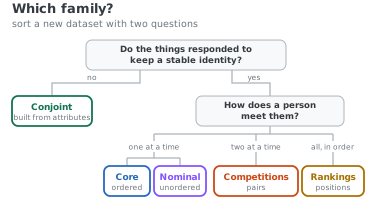
totals = home_stats.totals || {}

// A count is shown only if it is a positive number; anything else is treated as
// absent and the number is dropped from the tile, as the live hero does.
count = (v) => (typeof v === "number" && isFinite(v) && v > 0) ? v : null

// One entry per family. Adding a family means adding an entry here: the tiles,
// the tiles and the specimen card's family buttons both read this list.
// `count` is the field in hero_stats.totals that holds that family's table
// count -- core's is n_tables, which is the core count and not a grand total.
FAMILIES = [
  { key: "core",         name: "Core",         count: count(totals.n_tables), field: "n_tables",
    href: "standard.html",
    desc: "A person answers an item; the response is ordered.",
    // Simsyn is nested under core rather than given a tile of its own: the
    // page talks about five families, and simsyn is the one family defined by
    // where the data come from rather than by its shape (datapages/irw#386).
    // Its count is landing/hero_stats.R's n_tables_sim (ben-domingue/irw#3229).
    sub: { name: "Simulated and synthetic", href: "simsyn.html",
           count: count(totals.n_tables_sim), field: "n_tables_sim",
           desc: "Responses no real person produced." } },
  { key: "nominal",      name: "Nominal",      count: count(totals.n_tables_nom), field: "n_tables_nom",
    href: "nominal_standard.html",
    desc: "Categories with no order, like kept distractors." },
  { key: "competitions", name: "Competitions", count: count(totals.n_tables_comp), field: "n_tables_comp",
    href: "comps_standard.html",
    desc: "Two entities meet; one wins, or they draw." },
  { key: "rankings",     name: "Rankings",     count: count(totals.n_tables_rank), field: "n_tables_rank",
    href: "rankings_standard.html",
    desc: "A person puts a set of options in order." },
  { key: "conjoint",     name: "Conjoint",     count: count(totals.n_tables_conj), field: "n_tables_conj",
    href: "conjoint_standard.html",
    desc: "Choices between profiles built from attributes." }
]

// Six steps, in order. The last one gets the dashed pink treatment.
//
// Deliberately not links (Ben, 2026-10-28). These cards explain the shape of
// the workflow; they are not navigation. As links two of them pointed at the
// same page (Fetch and Cite both went to getstarted.html) and Understand went
// to the raw A-Z table index, which is a wall of links rather than an
// explanation -- and every page they would have reached is in the navbar
// already.
STEPS = [
  { name: "Find",       call: "irw_filter()",
    desc: "Filter on metadata before downloading anything." },
  { name: "Understand", call: "irw_info()",
    desc: "Provenance, licence and notes on every table page." },
  { name: "Fetch",      call: "irw_fetch()",
    desc: "One call for every family, long format." },
  { name: "Analyze",    call: "irw_long2resp()",
    desc: "Loop your method over hundreds of tables." },
  { name: "Cite",       call: "irw_save_bibtex()",
    desc: "Credit the original data authors in one call." },
  { name: "Contribute", call: "validate.html",
    desc: "Validate your file; it becomes the next table.", accent: true }
]

specimens = FileAttachment("data/specimens.json").json()